

 wp-backup
Smartphones have become an essential part of everyday life, helping people communicate, study, work, shop, and stay informed. However, spending too much time on social media, mobile games, and entertainment apps can make it difficult to concentrate on important tasks. Many people set screen-time limits but eventually ignore them when the temptation to scroll becomes too strong.
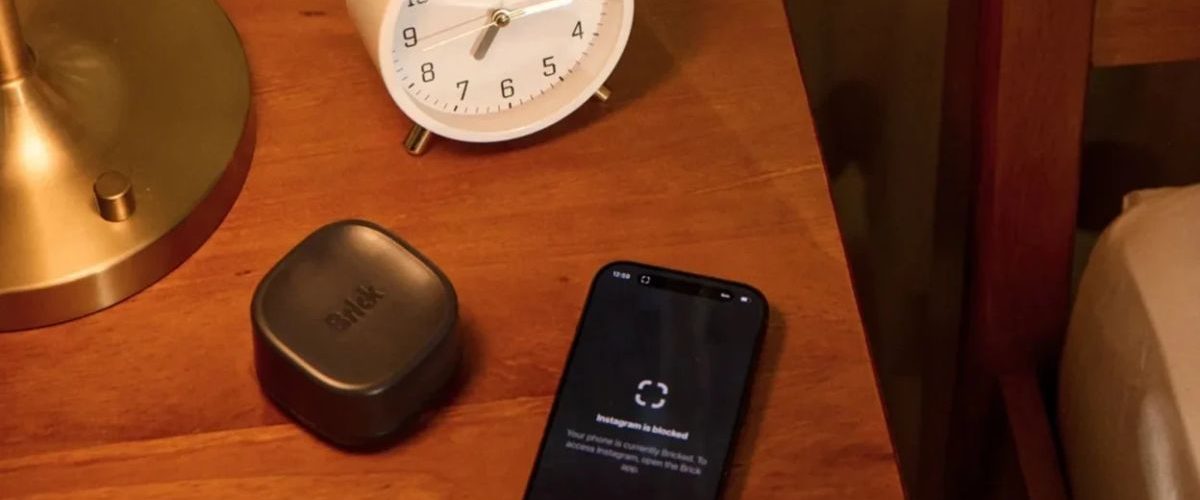
Brick offers a different approach to digital wellness. Instead of relying exclusively on reminders and software restrictions, the brand combines a physical device with a companion mobile app to help people create stronger boundaries around smartphone use. Its product range includes the original Brick device and Brick Night, a solution designed specifically for phone-free bedroom routines.
Both products aim to help users become more intentional about their technology habits. Whether you want to concentrate on work, spend more time with family, or reduce late-night scrolling, Brick provides practical tools for creating a more balanced relationship with your phone.
1. Brick: A Physical Phone Distraction Blocker
The original Brick device is designed for people who want to reduce unnecessary smartphone use without giving up their phones completely. Unlike conventional screen-time applications, which may allow users to dismiss restrictions with a few taps, Brick introduces a physical step into the process.
The device is listed at $59 on the official website. Its companion app allows users to select distracting applications and activate blocking sessions by tapping their phone against the physical Brick.
Key Features of Brick
Physical app blocking: Brick allows users to restrict selected distracting apps and websites. Depending on the settings they choose, users can block specific applications or limit access to everything except essential apps.
Custom focus modes: Users can create different configurations for various activities, such as studying, working, exercising, spending time with family, and relaxing. Each mode can support a particular routine rather than requiring the same restrictions throughout the day.
Intentional unlocking: To restore access to blocked applications, users generally need to interact with their physical Brick again. This extra step creates a pause between the urge to check an app and the decision to use it.
No recurring subscription: The official product information states that the purchase includes access to the companion app without additional subscription fees.
Compact design: The small physical device can be kept on a desk, shelf, bedside table, or another convenient location. Placing it away from your usual sitting area may help reinforce the habit of using your phone intentionally.
How Brick Helps Improve Productivity
Consider a student preparing for an important examination. Every time a social media notification appears, the student may stop studying, open an app, and spend several minutes scrolling through unrelated content. Repeating this pattern can interrupt concentration and make study sessions less productive.
With Brick, the student can create a study mode that blocks selected distracting apps. After activating the session, the student can place the device somewhere that requires getting up to reach it again.
This arrangement creates a practical barrier between studying and entertainment. It does not automatically improve concentration, but it can make unnecessary phone use less convenient.
Professionals can apply the same method during meetings, writing sessions, project planning, and other activities that require sustained attention.
Pros and Cons of Brick
Pros
- Helps reduce access to selected distracting applications.
- Supports personalized focus modes for different daily activities.
- Introduces a physical step before blocked apps can be restored.
- Includes companion app access without a recurring subscription.
- Can support study, work, family time, and personal productivity routines.
Cons
- Requires users to establish and maintain consistent habits.
- Focuses on smartphone applications rather than eliminating every possible digital distraction.
- May be less suitable for people who frequently need access to restricted apps.
- Requires a compatible smartphone and the companion app.
Brick is particularly relevant for students, remote workers, content creators, and anyone who repeatedly overrides ordinary screen-time limits.
2. Brick Night: A Device for Healthier Bedtime Habits
Brick Night extends the brand’s digital wellness approach to the bedroom. Many people intend to sleep early but continue checking messages, watching short videos, or browsing social media long after getting into bed.
These habits can delay bedtime and make it harder to maintain a consistent nighttime routine. Brick Night is designed to help users establish boundaries automatically rather than depending entirely on willpower each evening.
The official website lists Brick Night at $129. Its Bluetooth-based functionality is designed to block selected distracting apps when users enter their designated sleep space.
Key Features of Brick Night
Automatic app blocking: Brick Night is designed to activate restrictions through Bluetooth when users enter their designated bedroom or sleep area. This helps reduce the need to remember to start a blocking session manually.
Bedroom-focused routines: The product is intended to support a dedicated phone-free environment. Users can establish boundaries around bedtime and make their bedroom less associated with endless scrolling.
Customizable restrictions: Users can choose the applications they want to restrict through the Brick app, allowing them to focus on their main sources of nighttime distraction.
Convenient daily use: Automatic activation can make the process easier for people who struggle to follow manually scheduled routines consistently.
Digital wellness support: By reducing access to selected apps at bedtime, Brick Night can help users create more time for reading, preparing for the next day, relaxing, or spending time away from screens.
Why Brick Night Can Be Useful at Bedtime
Imagine someone who regularly goes to bed at 10:30 p.m. but continues browsing social media until midnight. Even when the person feels tired, the next video or notification can encourage another few minutes of screen time.
Brick Night offers a way to create a stronger boundary around this routine. Once the designated sleep-space conditions are met, selected applications can be blocked automatically.
Instead of repeatedly deciding whether to stop scrolling, users can establish a system that supports their intended bedtime.
It can also be useful for couples who want to spend more time talking before sleep, readers who want to replace scrolling with books, and professionals who need a clearer separation between working hours and personal time.
Brick Night is not a medical treatment for sleep problems, and its effectiveness depends on individual habits and setup. However, it can be a practical part of a broader routine that includes consistent bedtimes, reduced evening stimulation, and a comfortable sleeping environment.
Pros and Cons of Brick Night
Pros
- Designed to automate app blocking around a designated sleep space.
- Can help reduce late-night social media browsing.
- Supports more consistent phone-free bedtime routines.
- Offers a targeted approach to bedroom distractions.
- May reduce the need to activate restrictions manually every night.
Cons
- Costs more than the original Brick device.
- Depends on the intended Bluetooth-based setup and compatible devices.
- Requires users to configure restrictions according to their needs.
- Does not independently guarantee better sleep or resolve every cause of sleep disruption.
For people whose biggest screen-time challenge happens at night, Brick Night offers a more specialized approach than a device intended primarily for manually activated focus sessions.
Brick vs. Brick Night: Which Product Fits Your Needs?
Choosing between these products depends on when and where you experience the most distraction.
| Feature | Brick | Brick Night |
|---|---|---|
| Listed price | $59 | $129 |
| Main purpose | General app blocking and focus | Bedroom-focused app blocking |
| Activation | Physical tap or supported app controls | Bluetooth-based automatic activation |
| Ideal use | Studying, working, family activities | Bedtime and nighttime routines |
| Primary benefit | More intentional smartphone access | Fewer selected app distractions in the bedroom |
| Best suited for | Everyday productivity | Sleep-space boundaries |
The original Brick is a practical starting point for people who want to manage phone distractions across different activities. Brick Night is more specifically designed for people who want automatic restrictions associated with their sleep environment.
Before purchasing either product, check the current compatibility requirements, shipping availability, and setup instructions on the official website.
Tips for Getting More Value from Brick Products
Buying a digital wellness device is only one part of changing screen-time habits. The way you incorporate it into your daily schedule can make a significant difference.
1. Identify your biggest distractions. Review which applications consume the most unnecessary time. Social networking, short-video platforms, mobile games, and entertainment apps are common starting points.
2. Create separate modes for different activities. A study mode may block social media, while a family-time mode may restrict entertainment applications. Keep essential communication tools accessible when necessary.
3. Keep your goals realistic. Start with one or two distraction-free periods each day instead of attempting to change every habit immediately.
4. Establish a phone-free bedtime. If nighttime scrolling is your main challenge, combine app restrictions with a consistent bedtime and an alternative activity, such as reading or preparing for tomorrow.
5. Protect essential access. Before activating any restrictions, consider work requirements, family responsibilities, navigation needs, and emergency communication. Understand the available emergency-unblocking options.
6. Track your progress. Compare your daily screen-time patterns over several weeks. Pay attention to whether you are spending more time on meaningful activities, not just whether your phone usage decreases.
7. Combine digital tools with environmental changes. Keep your phone away from your workspace when possible, use a separate alarm clock if practical, and establish clear periods for checking messages.
These simple practices can help users make the most of Brick’s physical app-blocking approach.
Where to Buy Brick and Brick Night
Both products are available through the official Brick website. Purchasing directly allows shoppers to check current product information, compatibility requirements, available bundles, and applicable promotions before ordering.
- Brick — $59: Suitable for people seeking a physical tool for managing distracting apps during work, study, and everyday activities.
- Brick Night — $129: Designed for users who want Bluetooth-based app blocking associated with their designated sleep space.
Prices, bundles, shipping terms, and promotional offers can change. Check the official product pages for the latest information before making a purchase.
Building Better Digital Habits with Brick
Managing smartphone use does not necessarily mean abandoning technology. The goal is to make technology work for your priorities instead of allowing notifications and endless feeds to control your schedule.
Brick and Brick Night approach this challenge in two different ways. The original Brick device supports intentional app blocking across daily activities, while Brick Night focuses on reducing selected distractions in the bedroom.
For students, professionals, families, and people who want to spend less time scrolling, these devices provide a structured way to establish boundaries around smartphone use. When combined with realistic goals and consistent routines, they can help create more opportunities for focused work, meaningful conversations, relaxation, and offline activities.







Add comment